Invert Images Online Free Tool

Interactive • Private • No Registration • No AI • No Restrictions

Negative Image Effect - Invert Colors

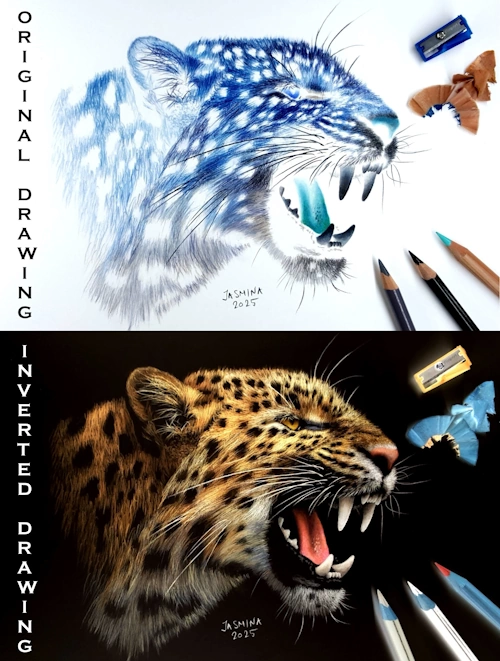
An inverted (negative) image is created when light and dark values are reversed - areas that are normally dark become light, and light areas become dark. Colors are also inverted into their complementary opposites: green becomes magenta, blue becomes yellow, etc. Our Invert Images Online Free Tool automatically converts all color values in an uploaded photo to create a negative image instantly.


Why would you need a negative image?

Color inversion is useful in many real-world situations:


  • Artists and painters use negative images to study values, contrast, and composition without being distracted by colors.
  • Photographers check exposure and lighting balance by flipping light and dark areas.
  • Designers use inverted images to create posters, thumbnails, and stylized graphics.
  • Students and teachers use negative images for visual experiments and art exercises.
  • Accessibility and readability – inverted colors can improve visibility and reduce eye strain.
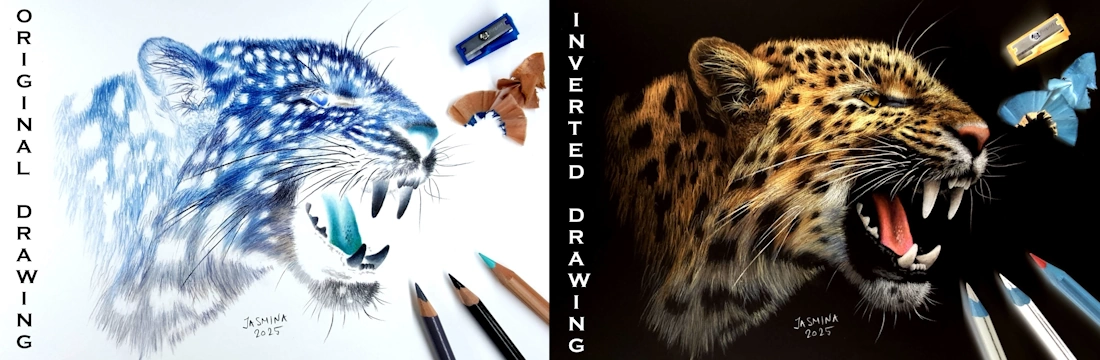
Many artists practice inverted drawing to improve observation skills and train their artistic eye. Colored pencil artist Jasmina Susak often uses this technique by first inverting the reference photo, drawing exactly what she sees, and then inverting the finished artwork too. She also shows this process in her drawing videos, where the original and negative versions appear side by side.

Sketcher App banner showing photorealistic strawberry reference converted into white, gray, and black paper line art modes with traditional art tools. Mobile view of Sketcher App comparing a strawberry photo to artist-grade line art outlines for traditional drawing.

Invert Images Online Examples and Demos - Ideas and Tips


Invert Images Online Free tool demo showing pencil sketch on white background turned to white lines on black background.

Turn Sketches into White Lines on Black Background


1. Convert your image to a pencil sketch using our Photo to Sketch Converter Online Free interactive tool, then download it.


2. Upload the sketch here in our Inverter tool to get white outlines on a black background. Download the image and color over it. You can color digitally in your preferred app, or print it and draw traditionally on top using your favorite medium. Artists typically use white charcoal or pastel, colored pencils, opaque markers, or pens - any medium that is not too transparent and shows up well on black paper.


Why Artists Love Inverting Sketches:

  • The "Glow" Effect: Inverting a sketch creates high contrast. When you add neon or bright colors on top of a black background, your art looks like it’s glowing.
  • Mastering Values: Working on a dark background forces you to think about "Highlights" first, which is a great exercise for improving your shading skills.

More Free Online Tools from FreeToolio


Liquify and Warp Images Online - Smudge Tool


Link to Liquify and Warp Images Online.

Liquify/Warp

Photo to Sketch Converter Online Free


Link to Photo to Sketch Converter Online Free Tool.

Photo to Sketch

Color Adjustment Image Online Free Tool


Link to Photo to Sketch Converter Online Free Tool.

Adjust Colors

Convert and Compress Images Online


Link to Convert and Compress Images Online.

Convert / Compress
f ⌁ x r @ βœ‰ p wa tg in ⧉